How to Deposit on Olymp Trade Using M-Pesa (Kenya Guide)
You’ve set up your Olymp Trade account. You’ve probably spent time on the demo, watched a few trades, and decided you’re ready to go live. Now you’re staring at the deposit screen wondering: does M-Pesa actually work here? Will it go through instantly? Are there hidden fees? What happens if it fails?
This guide answers all of that.
The exact steps to fund your Olymp Trade account using M-Pesa in Kenya, plus the fees, limits, and fixes for when things go sideways.
TL;DR: Deposit on Olymp Trade Using M-Pesa
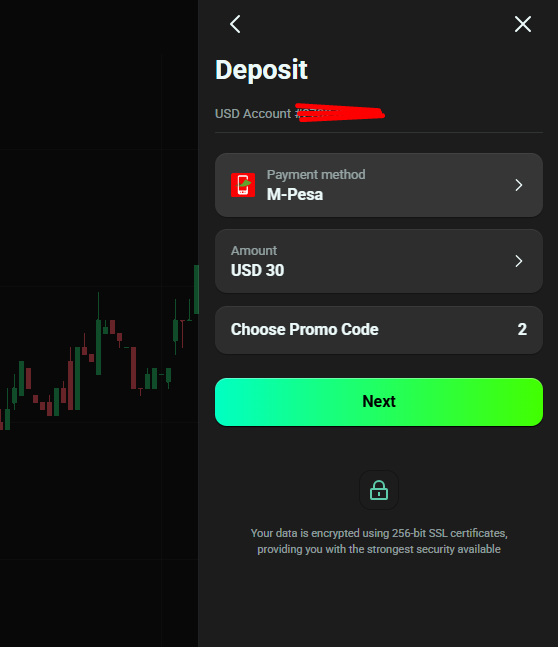
- Yes, M-Pesa works directly on Olymp Trade. No third-party apps needed.
- Minimum deposit: $10 (roughly KES 1,300, depending on the exchange rate).
- Olymp Trade charges zero deposit fees. Safaricom’s standard M-Pesa transaction charges apply on your end.
- Speed: Funds hit your trading account instantly once you confirm your M-Pesa PIN.
- Steps in short: Log in, click Deposit, choose M-Pesa, enter amount, enter your number as 254XXXXXXXXX (no + sign), confirm PIN, done.
- Critical rule: Whatever method you use to deposit, that same method locks in for withdrawals. Use M-Pesa to deposit, and your winnings come back to M-Pesa.
Before You Deposit: Two Things You Must Have Ready
A lot of Kenyan traders skip these and then hit a wall mid-process. Don’t be one of them.
1. A verified Olymp Trade account.
Olymp Trade is regulated by the International Financial Commission (IFC). Before they let you move real money, they need to confirm who you are.
This means uploading your National ID and a clear selfie. Verification usually takes a few hours. If your account is not verified and you try to deposit a large amount, you may face a hold on your funds. Verify first, deposit second.
2. Sufficient M-Pesa balance.
Your M-Pesa wallet needs to cover the deposit amount plus Safaricom’s transaction fee. The fee is small but varies by amount. A KES 1,300 deposit will attract a Safaricom charge. Factor that in so the transaction does not fail mid-way.
Step-by-Step: How to Deposit on Olymp Trade Using M-Pesa
This is the direct M-Pesa integration built into Olymp Trade’s platform. No Skrill, no Eastpesa, no middlemen.
Step 1: Log into your Olymp Trade account

Open the Olymp Trade website or mobile app on your phone or browser. Use your registered email and password. If you are using the mobile app, it works on both Android and iOS.
Step 2: Click the “Deposit” button
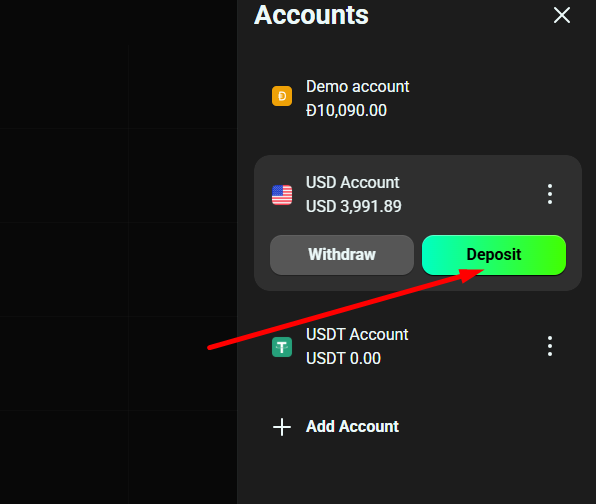
You will find the green “Deposit” button at the top right corner of your trading dashboard. Click it. You will be redirected to the payment methods page.
Step 3: Select M-Pesa as your payment method
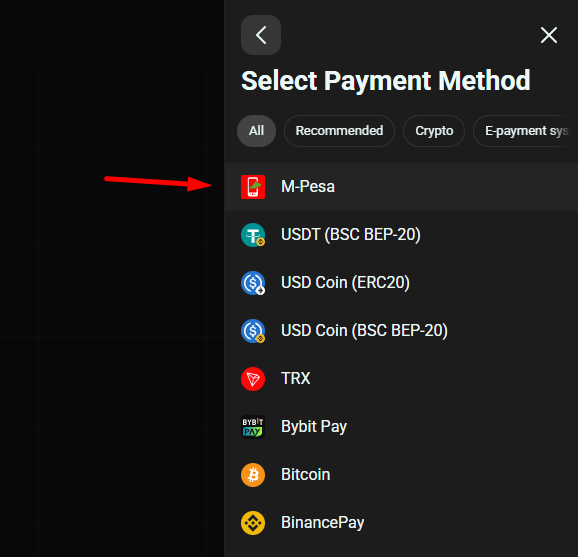
On the deposit page, you will see a list of available payment options. Since you are in Kenya, M-Pesa should appear as an option. Tap or click on it.
Step 4: Enter the deposit amount
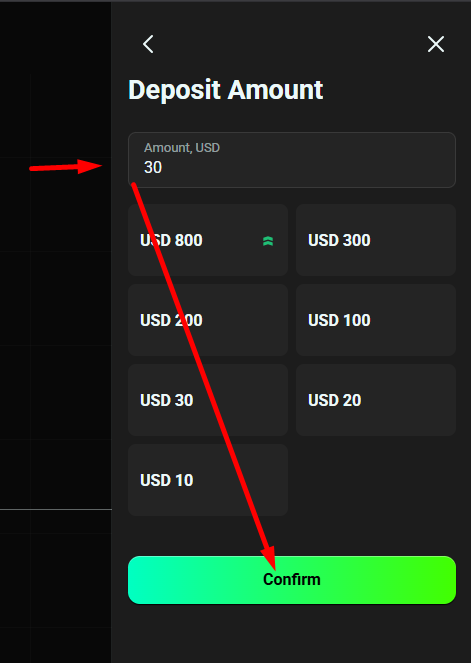
Type in the amount you want to deposit. Remember:
- Minimum deposit: $10 (approximately KES 1,300)
- No maximum deposit from Olymp Trade’s side, though M-Pesa’s daily transaction limits from Safaricom will cap how much you can send in a single transaction
- If you want to deposit more than M-Pesa’s per-transaction limit, you can do multiple deposits
Step 5: Enter your M-Pesa phone number
This part catches many people off guard. Enter your Safaricom number in this exact format:
254708655398 (replace the last digits with your own number)
Key points:
- Drop the leading zero from your number (so 0722 becomes 254722)
- Do NOT include the plus (+) sign before 254
- Make sure it is the number linked to your active M-Pesa wallet
Step 6: Click “Deposit” or “Next”
Once your amount and phone number are in, hit the deposit button. Olymp Trade will process the request and send a payment prompt to your phone.
Step 7: Enter your M-Pesa PIN on your phone
Within seconds, your Safaricom number will receive a push notification or USSD prompt asking you to confirm the payment and enter your M-Pesa PIN. Enter your PIN and press OK to approve.
Step 8: Funds reflect in your account
Once the PIN is confirmed, the money moves instantly. Refresh your Olymp Trade balance and you should see the funds there immediately, ready for live trading.
Total time from start to finish: Under 3 minutes.
Fees and Limits Breakdown
Here is the full picture so there are no surprises:
| Item | Detail |
|---|---|
| Olymp Trade deposit fee | KES 0 (zero) |
| Safaricom M-Pesa transaction charge | Varies by amount (standard Safaricom tariffs apply) |
| Minimum deposit | $10 (approx. KES 1,300) |
| Maximum deposit (Olymp Trade side) | No cap |
| M-Pesa per-transaction limit | Subject to Safaricom’s daily/transaction limits |
| Speed | Instant upon PIN confirmation |
| Withdrawal method locked in | Yes. M-Pesa deposit means M-Pesa withdrawal only |
Olymp Trade charges nothing on their end for deposits. The only cost you pay is Safaricom’s standard mobile money fee, which scales with the amount you are sending. For amounts above KES 1,500, the charges are minimal relative to the deposit size.
Read also: Olymp Trade Minimum Deposit in Kenya.
Is It Safe to Deposit on Olymp Trade Using M-Pesa in Kenya?
Two things to look at: Olymp Trade’s credibility, and M-Pesa’s security.
Olymp Trade’s regulatory standing: Olymp Trade is regulated by the International Financial Commission (FinaCom). In the event of a dispute between you and the broker that gets resolved in your favor, FinaCom provides compensation of up to $20,000. That does not mean the platform is risk-free for trading, but it does mean the company is accountable.
M-Pesa’s security: Safaricom, the company behind M-Pesa, is listed by the Central Bank of Kenya as an authorized Payment Service Provider. Safaricom also monitors transactions and reports suspicious activity to the Financial Reporting Centre under Kenya’s AML frameworks. Every transaction requires your personal PIN, meaning no one can move money out of your wallet without it.
Bottom line: The deposit channel itself is secure. The trading risk is a separate conversation.
Olymp Trade M-Pesa Not Working? Here’s How to Fix It
The Olymp Trade M-Pesa deposit fails for a handful of predictable reasons. Work through this list before contacting support:
Problem: M-Pesa option not showing on the deposit page
- This can happen during platform maintenance windows or if there is a temporary service interruption. Wait a few hours and try again. If it persists beyond 24 hours, reach out to Olymp Trade’s live chat support.
Problem: You entered the wrong phone number format
- The most common mistake. Double-check that your number starts with 254, has no + sign, and has no spaces. Example: 254712345678.
Problem: The transaction prompt never arrived on your phone
- Check your Safaricom network signal. A weak connection delays or drops the prompt. Move to an area with better coverage and retry.
Problem: Insufficient M-Pesa balance
- Your wallet balance must cover the deposit amount AND Safaricom’s transaction fee. If your balance is exactly the deposit amount with no buffer, the transaction will fail. Top up first.
Problem: Funds deducted from M-Pesa but not credited to Olymp Trade
- This is rare but it happens. Do not panic. Check your M-Pesa transaction message for a confirmation code. Screenshot it and immediately contact Olymp Trade support via live chat with that reference. Olymp Trade’s team can trace and credit the funds, usually within a few hours.
Problem: Your account is unverified
- Olymp Trade may hold or reject deposits on unverified accounts. Complete your identity verification (National ID plus selfie) before attempting to deposit again.
One Rule That Will Save You Confusion Later
When you make your first real-money deposit on Olymp Trade, the platform locks in that payment method for withdrawals. This is standard practice across most online trading platforms.
If you deposit using M-Pesa, you will only be able to withdraw back to M-Pesa.
This is actually ideal for most Kenyan traders. The whole cycle stays within Safaricom’s ecosystem. No bank cards that might decline, no e-wallet accounts to manage. Your profits go straight back to the same M-Pesa number you deposited from.
How to Withdraw Your Funds Back to M-Pesa
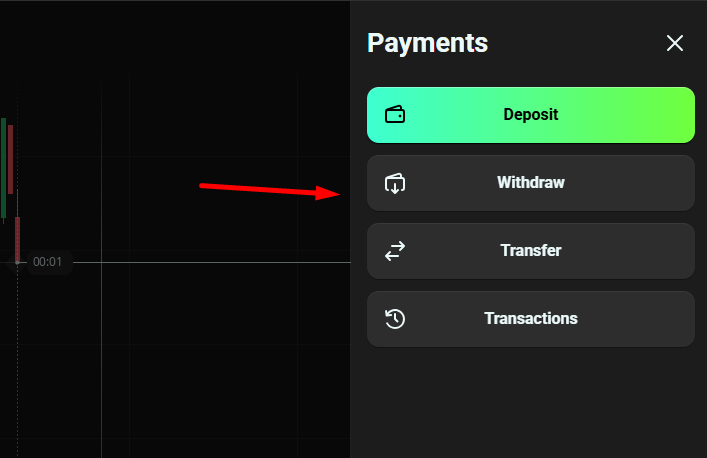
Since you are reading this to fund your account and start trading, keep this in your back pocket for when you are ready to cash out:
- Click on your account profile and navigate to the Withdraw section.
- Select M-Pesa as your withdrawal method.
- Enter the amount you want to withdraw and confirm your phone number.
- Submit the request.
Withdrawals typically reflect on the same day if processed during business hours. Olymp Trade’s official timeline is 1 to 5 business days, but most Kenyan traders report same-day processing when the withdrawal is requested early in the day.
Final Checklist Before You Hit Deposit
Use this before every deposit to avoid the common failure points:
- [ ] Olymp Trade account is fully verified (National ID uploaded, selfie approved)
- [ ] M-Pesa balance covers deposit amount plus Safaricom transaction fee
- [ ] Phone number entered as 254XXXXXXXXX with no + sign and no spaces
- [ ] Safaricom network signal is strong on your phone
- [ ] You are depositing the minimum of $10 or above
Once those boxes are checked, the process takes under three minutes. Your account gets funded instantly, and you can start placing live trades immediately.
Olymp Trade has made the M-Pesa deposit process as direct as it gets for Kenyan traders. No workarounds, no third-party wallets, no bank cards that might reject an online trading platform. Just your Safaricom number, your PIN, and your account is live.
The only thing left is to actually place that first trade.
Trading involves risk. Only deposit money you are genuinely prepared to trade with. Start with the minimum if you are still building your strategy.
Read also: